Hey! this is my digital art and photography blog for seventh grade.
Thursday, 10 January 2019
Street Art Piece
I chose to make my street art inspiring, using an inspiring message. Save the fisheez. Fish are being killed daily for some humans to eat and just to last them for less than twenty four hours before it leaves their bodies. Just do not eat the fisheez. Especially the ones that look like the picture above. I just drew this picture by unleashing my inner love for the fisheez. i spray painted their ocean and them and they would be so happy to see this if they could only walk on land. Thank you for listening to my speech and please, give me money that I will definitely spend on the fisheez. Love ya the most.
ArtRage Stencils
This is what I created using the theme provided stencils. I began by blending a few shades of green together as a background. I then chose stencils and using the airbrush tool made some faded out snowflakes and dandelion looking images. I then saved the file as an image and posted it to my blog.
Rothko-esque Painting
This is my Rothko-esque painting I made using ArtRage. I began by blending two shades of blue together to make a background. I then added my colors and blended the base and their edges to create a glowing affect. Finally I saved the as an image file and uploaded it to my blog.
Thursday, 29 November 2018
Celebrity With Animal Name
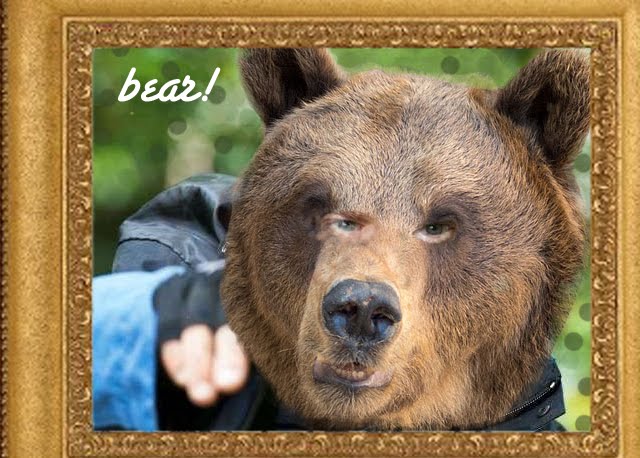
This is my celebrity with animal name assignment. I began by choosing an image of the celebrity I wanted to turn into an animal, Bear Grylls. I took the image of him, and an image I found of a bear and began by using a low opacity eraser to discard parts of the bear I would not be needing. I then began fading the edges of the bears face so it would blend in with the background. Then, I choose which part of the humans face I wanted to stand out which happened to be the eyes. I then used a low opacity eraser to let the right eye shine through and used a brown paintbrush to cover up the bears other eye. Finally, I repeated the same steps to let the other eye stand out, and flattened the image.
So here is the official, Bear Grylls!
Friday, 16 November 2018
Scanned Felt Tip Drawing
This is my scanned felt tip drawing. I began this assignment by grabbing a piece of plain white paper as well as a black flair pen and pencil and began to sketch out a outline of what I wanted. I then traced it with the black flair pen and used a scanner to scan the image onto a flash drive, and then import it onto my computer desktop. I then inserted it into adobe photoshop elements ten and added color to make it look like a beaker full of letters. Finally I uploaded it to my blog.
Photography Challenge Number 1
Day one of the thirty day photography challenge. This is a self-portrait I took ad used an app with auto filters to give a more amplified look to the golden hour sunset. I also used a gorgeous red leaf I found on the ground to add more dimension and amplify the colors in the image. I even used my hair pulled down sleekly around my head to frame my face.
Day five of the thirty day photography challenge. This is the image I took in Sedona in the morning, with the theme morning sky.
Day six of the thirty day photography challenge. This image is taken with the theme from a low angle (worms eye view)
Day seven of the thirty day photography challenge. This image has the theme fruit.
Day ten of the thirty day photography challenge. I took this image with the theme in mind a childhood memory, because I used to dig in the dirt with my brother.
Day eleven of the thirty day photography challenge. I took this image with the theme in mind something blue.
Day thirteen of the thirty day photography challenge. I took this image with the theme in mind yourself with thirteen things.
Day sixteen of the thirty day photography challenge. I took this image with the theme in mind long exposure.
Day twenty of the thirty day photography challenge. I took this image with the theme in mind bokeh.
Day twenty one of the thirty day photography challenge. I took this image with the theme in mind faceless self portrait.
Day twenty two of the thirty day photography challenge. I took this image with the theme in mind hands.
Day twenty three of the thirty day photography challenge. I took this image with the theme in mind sunflare.
Day twenty four of the thirty day photography challenge. I took this image with the theme in mind animal.
Day twenty five of the thirty day photography challenge. I took this image with the theme in mind something pink.
Day twenty seven of the thirty day photography challenge. I took this image with the theme in mind from a distance.
Day twenty eight of the thirty day photography challenge. I took this image with the theme in mind flowers.
Day twenty nine of the thirty day photography challenge. I took this image with the theme in mind black and white.
Day thirty of the thirty day photography challenge. I took this image with the theme in mind self portrait.
Thursday, 1 November 2018
Wake Me Up!
This is my comic strip called wake me up. It is inspired by the song called wake me up which I thought would be a funny story line to base my comic off of. I began by taking the pictures I needed for each line of lyrics and uploaded them to my computer. I then made a base layout of how my comic would begin and how the scenes would be placed. I then cut out the images to fit the way I wanted them to and added the paint i would need to adjust the images to my liking. Finally, I cut out the text boxes and added the lines of text from the song. I tricked you! That was not the final step the final step was that I posted my image to my blog!
Subscribe to:
Posts (Atom)
Most Recent Work
30 Day Photography Challenge 2
Day 1 - Favorite Food I took this photo by using my phone and an app called huji that offers automatic filters to create a cool, arts...
-
I made this by using photoshop CS5 and cutting the text out of an image of the sunset,and placing it over an ocean image.
-
I made myself be at the Great Pyramid of Giza. I took a picture of myself and used a picture of the pyramid. I then used the magnetic lass...
-
I made this by taking an image of a woman and a waterfall and taking the lady and blending the side of her face out into a waterfall so it...


